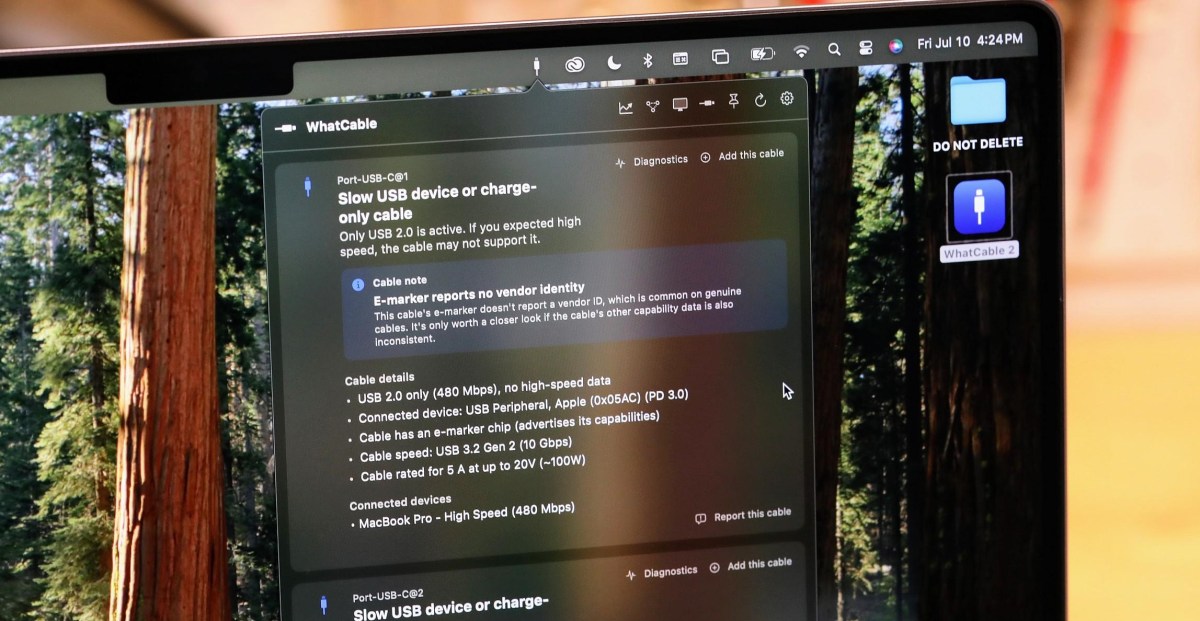
Darryl Morley has released WhatCable, a free macOS utility that lets Apple Silicon Mac owners inspect what their USB-C cables and connected devices report, and what the Mac is actually doing with them. For anyone with a drawer full of identical-looking USB-C spaghetti, that is useful information Apple already has but mostly keeps out of sight.
The app lives in the Mac menu bar and shows attached USB-C cables, devices, chargers, and ports. According to Morley, it works because every Apple Silicon Mac includes a port controller that handles USB Power Delivery negotiation. When a cable has an e-marker chip, that controller asks the cable for its identity and receives structured data including vendor ID, speed rating, current rating, voltage limits, and whether the cable is active or passive.
Morley told The Verge that macOS writes that response into the IOKit registry. WhatCable reads it using Apple’s public APIs, with no root access or private entitlements, he said. The app also pulls information from the Mac’s own hardware, including negotiated USB speed, Thunderbolt link speed, and live voltage and current at each port. Combined with device-reported capabilities, that can show whether the cable, the device, or the Mac is the bottleneck.
The catch is the usual USB-C garbage fire: a cable’s e-marker can claim more than the physical cable can deliver. The Verge’s Sean Hollister tested the app across several cables and found both useful confirmations and misleading reports.
In one test, a short Satechi cable reported USB 2.0 data at 480Mbps but 5-amp charging at up to 20 volts, about 100 watts. Hollister said that matched his experience with the cable, making it slow for data but still useful for charging a MacBook Pro. He also found that WhatCable could identify a 100W charger and show power behavior that an older cheap hardware tester could not read from the cable’s e-marker.
Another test was messier. Hollister plugged in a Supercalla cable whose e-marker claimed 10Gbps data and 100W charging, but the Mac did not use it at that rate with a fast external SSD. WhatCable also reported multiple connection drops. Hollister concluded that his everyday cable appeared to be failing.
A 240W USB4 cable rated for 40Gbps fared better. WhatCable identified it as Thunderbolt 4-class, and when Hollister connected a drive, the app showed the Mac running a 10Gbps link. A 25GB file transfer finished in seconds rather than minutes, according to his test.
There were also cases where WhatCable exposed the limits of trusting reported identity data. Hollister tested a charging cable sold as USB 2.0 on Amazon. Its e-marker advertised 10Gbps USB 3.2 Gen 2 support, but the same 25GB transfer took minutes, and a separate hardware tester showed no SuperSpeed support. The cable did deliver 5-amp charging, according to his testing.
Morley is not the only developer to use a MacBook as a USB-C tester. The paid app USB Connection Information offers a similar idea. WhatCable’s core version is free, while a £9.99 Pro version adds a real-time power monitor, diagnostics, and a terminal view. Morley has also made WhatPort, a simpler app for watching each USB-C port’s current power, data, and video state.
Platform support is limited by OS access. Morley told The Verge he does not expect to build a Windows version because of hardware variation and missing API access. He said Android and iOS also do not expose enough low-level data. A Linux port is in development, and Mac updates are being posted on GitHub.
This story draws on original reporting from The Verge.