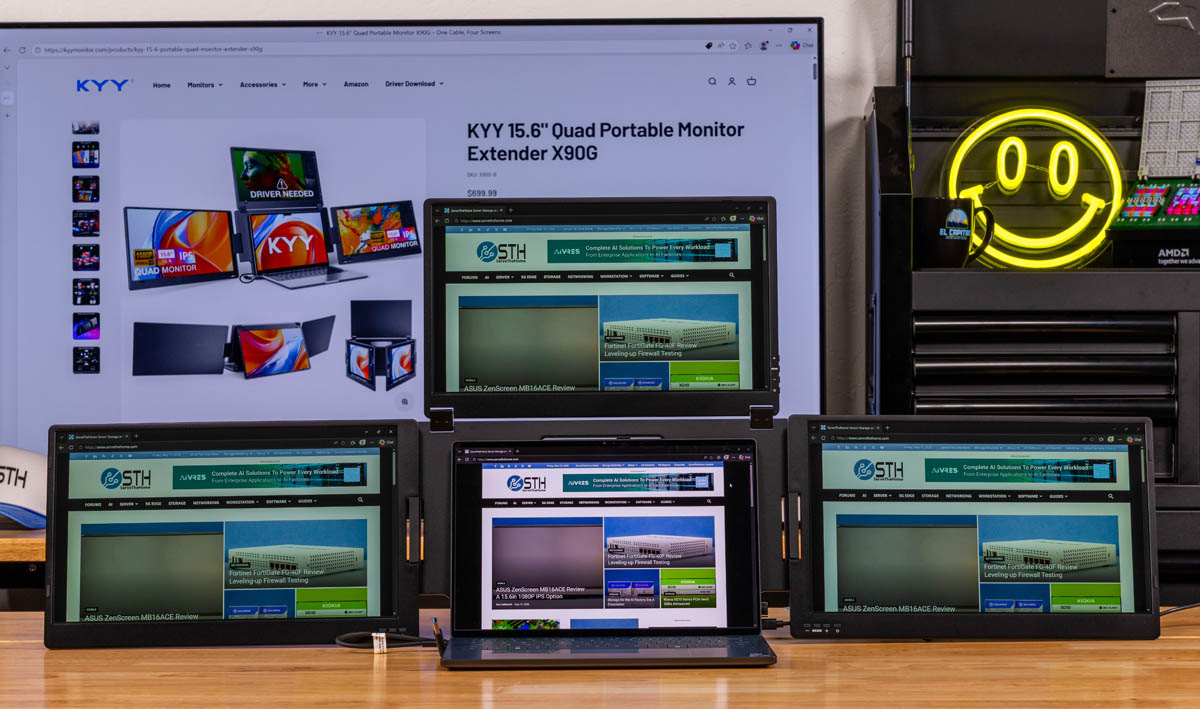
KYY is selling a portable monitor setup for people who think one extra travel screen is a personal insult. ServeTheHome reviewed the KYY X90G “Quad” portable monitor, a folding unit with three 15.6-inch displays that sits around a notebook and turns the laptop’s own panel into the fourth screen.
The “Quad” label is doing some accounting work. According to ServeTheHome, the hardware itself contains three monitors, each a 1920×1080, 60Hz IPS panel. The fourth display is the laptop already on the desk. That is less slick than the name suggests, but the result is still unusual: a mobile workstation arrangement closer to a desk setup than the usual single USB-C travel panel.
ServeTheHome said the X90G normally lists at $479, though pricing may vary with sales. The review framed it as a niche tool for people who depend on multiple screens while traveling, rather than a casual accessory to toss into a shoulder bag.
A folding frame, not a thin travel panel
The X90G folds shut with its display surfaces protected inside, which ServeTheHome called a useful design choice. Closed, it does not look like a typical portable monitor because the screens are hidden. Open, the three panels spread out around the notebook, supported by a kickstand and a heavy-duty frame.
That frame has consequences. ServeTheHome reported the unit is listed at 1.6 kilograms, a little over 3.5 pounds. The review paired it with a Dell XPS 14 2026 and found the monitor assembly heavy enough that it went into a carry-on suitcase rather than a briefcase. The site compared the weight to something closer to a 14-inch Apple MacBook Pro than to a lightweight single-screen portable monitor.
The reviewer also warned that setup needs care. Because the panels are large and the assembly is heavy, opening or positioning it incorrectly can tip the whole rig. KYY’s product pages show other orientations, and ServeTheHome said one possible use would be as a central display for a small presentation.
Three separate monitors in one shell
The X90G does not behave like one centrally managed display wall. ServeTheHome described it as three distinct monitors packaged together. Each screen has its own controls and on-screen display, so users can set different brightness levels or other options per panel. The physical buttons are similar, but their placement changes depending on which panel is being adjusted.
Connectivity is concentrated in the center section. ServeTheHome found two USB-C ports: one multi-function port and one power port. The review said a single-cable setup did not work reliably in testing because the monitor array draws a substantial amount of power. That undercuts one of the usual pleasures of USB-C portable monitors, which is plugging in one cable and getting both power and display.
KYY includes two cables, according to ServeTheHome. One is marked as the power cable. The package also includes a USB-C power adapter with a single Type-C port.
The unit also shipped with a USB drive. ServeTheHome did not use it, but said it likely contains the Silicon Motion utility needed during MacBook setup to connect all three external screens. The review described that process as more involved than plug-and-play.
Useful, awkward, and very specific
ServeTheHome’s early verdict was that the X90G is large, expensive, and more complicated than a normal travel display, yet genuinely useful for a certain kind of user. The appeal is obvious enough: three external 1080p panels plus the laptop display, in a cleaner package than a home-built tangle of portable monitors and stands.
The trade-off is equally obvious. Buyers get a transportable multi-monitor station, not a featherweight accessory. For people who work best with several windows visible at once, KYY’s strange folding slab may be the tidy answer. For everyone else, it is a lot of monitor to carry through an airport.
This story draws on original reporting from ServeTheHome.