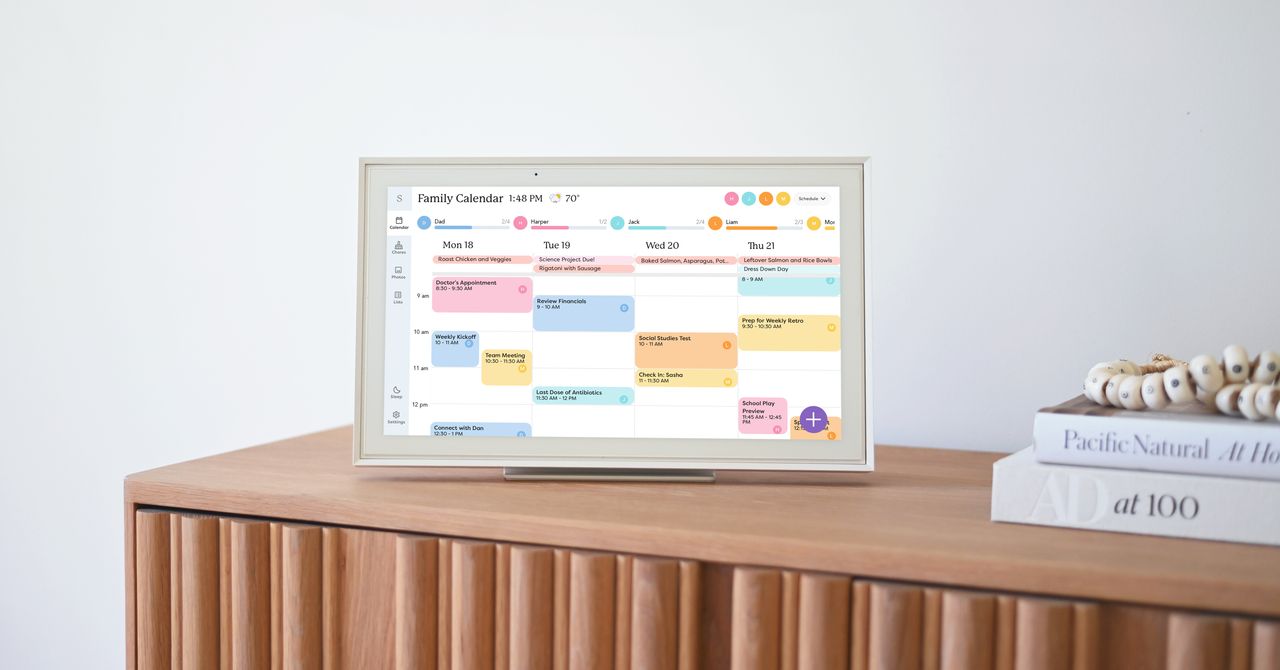
Skylight’s digital family calendar did something a shared Google Calendar had not managed on its own: it gave older kids a usable view of the household machine, according to WIRED contributor Jaclyn Greenberg, who tested the device with her family of five.
Greenberg wrote that the setup mattered because her household runs on a pile of school calendars, extracurriculars, work schedules, grocery lists, meals, chores, and the usual domestic admin nobody has yet managed to automate without creating three more apps. Her family had already been using Google Calendar, but she found that a phone-based shared calendar was only a partial fix.
The device Greenberg tested was Skylight’s 15-inch touchscreen calendar, placed on a kitchen counter with its built-in stand. Skylight also sells 10-inch and 27-inch versions, and the two larger models can be wall-mounted, according to the product details cited by WIRED. Greenberg said her family installed the Skylight app on their phones and connected it to the main display.
Skylight can pull in calendars from Google, Apple, Microsoft, and Yahoo. In Greenberg’s case, her 12-year-old son imported her Google Calendar, created color-coded calendars for each child, and assigned household chores their own color. That is the useful kind of child labor: categorization.
The strongest result, Greenberg wrote, was not the screen itself. It was that her 15-year-old and 12-year-old began checking the family schedule before making plans. That shifted some planning responsibility away from the parent who had been acting as the human API for every Thursday hangout request.
There was a privacy trade-off. Greenberg said notes attached to her Google Calendar became visible to the family after import, including reminders she had intended for herself, such as a note about shopping for a son’s birthday gift. Shared calendars are still shared databases, even when wrapped in a nicer kitchen appliance.
Paid tools add automation, with rough edges
Some Skylight features require the Plus subscription, which WIRED listed at $79 per year or $8 per month. The paid tier includes meal planning and an AI-powered assistant called Sidekick.
Greenberg found Sidekick useful for turning school schedules and activity notices into calendar entries from a photo of paper or a forwarded email. She said the resulting events were not perfectly accurate, but they reduced the manual typing that comes with managing multiple children’s schedules.
Sidekick can also scan printed recipes into a database and add meals to the weekly calendar. Greenberg said the app could add recipe ingredients to a grocery list, which worked well for a short kale chips recipe. It became less helpful for minestrone soup, where the app added every small ingredient, down to a dash of salt.
The shared grocery list was one of the practical wins. Instead of a paper list stuck to the refrigerator, each family member could add items through the app, and whoever was near a store could check the current list.
The screen is useful, but the phone app did much of the work
Greenberg’s main hardware complaint was the lack of a battery. The 15-inch display has to stay plugged in, so editing from the couch is out unless an outlet is nearby. She said she made more changes in the mobile app than on the touchscreen, while her husband and children also leaned heavily on their phones.
WIRED also compared Skylight with Jam Family Calendar and Family Wall, both software-only options. Greenberg said Jam offered similar basics, including color-coded calendar imports, to-do lists, and grocery lists. Family Wall added features including a family budget, contact book, meal planner, document storage, chat, optional location sharing, and birthday countdowns.
Greenberg’s conclusion was measured: shared family calendar tools made responsibilities more visible and helped her kids take on more scheduling responsibility, though she still opened Google Calendar out of habit and concern that something might be missed.
This story draws on original reporting from WIRED.