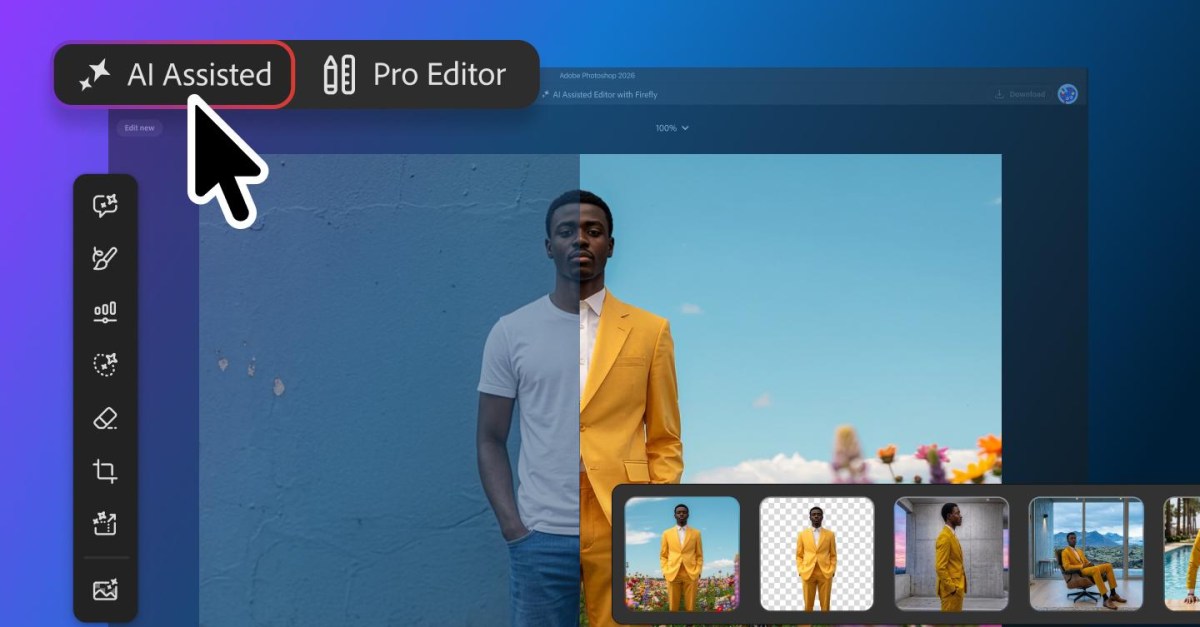
Adobe’s Photoshop AI Assisted Editor entered beta on Aug. 27 as an optional, prompt-first workspace inside the image editor. The new view groups several generative editing tools behind a simplified interface, but it does not replace Photoshop’s established Pro Editor, according to Adobe. For people who would rather type an instruction than hunt through panels, that is the point.
Adobe says the beta workspace includes Prompt to Edit, Remove Background, Generative Expand, Remove Tool, Generative Fill, Generative Upscale and AI Markup. Photoshop already had AI-backed capabilities before this update, including Generative Fill and Generative Expand, as Adobe’s product materials show. The change is largely about putting those functions into a dedicated, less tool-dense editing route.
What tools are in Photoshop AI Assisted Editor?
AI Assisted Editor combines text-prompt editing with common one-click and generative operations. A user can ask Photoshop to alter an image, remove a background or unwanted object, enlarge the canvas and generate content for the new area, add or replace elements, or increase resolution. Adobe describes it as an alternative workspace for prompt-based work alongside the conventional editor.
Independent reporting from 9to5Mac says the mode is reached through a menu-bar toggle and that users can continue into the traditional Pro Editor after making changes. The beta label matters: Adobe has not established a broader release timetable in its announcement.
How do Markup and Prompt to Edit change Photoshop editing?
AI Markup is Adobe’s attempt to make a text instruction less vague. Rather than describing a location entirely in prose, users can draw directly on the image: mark an area for recoloring, draw an arrow toward a desired position, or brush a rough shape where a new object should go. Adobe says the marks give its model visual guidance about the requested change.
Prompt to Edit is also available in the Pro Editor’s Contextual Task Bar, Adobe says. It applies natural-language instructions to the image without requiring the user to make a selection first. Each output is placed in the layer stack as a generative layer, which means the edit remains organized separately from the underlying image rather than being baked directly into it.
For more targeted requests, Adobe also updated Instruct Edit with Masks. The company says Firefly Image 5 can use context from the full image while users describe a change, such as modifying a person’s eyes or adding an item. Adobe further says areas outside the mask remain unchanged. Those claims describe intended behavior, not independently tested results, and generated edits still warrant the usual close inspection for unwanted changes.
Other Photoshop changes arrive with the AI beta
- Light Adjustment Layer: Adobe says this adds non-destructive controls for exposure, contrast, highlights, shadows, whites and blacks.
- Dynamic Text, Shapes and Paths: Text can follow custom shapes and paths while retaining formatting, according to Adobe.
- Adobe Stock panel: Adobe says Photoshop now has a dockable panel for searching, previewing and using its Stock assets.
The update divides Photoshop work into three paths: the beta AI Assisted Editor for prompt-first editing, Prompt to Edit in Pro Editor for broad changes without selections, and Markup or masked instructions for edits that need a clearer target. That is more useful than pretending a generative model understands what “fix that bit over there” means on the first try.
This story draws on original reporting from The Verge.