Asus and Xreal have built a gaming version of the familiar “virtual big screen” AR glasses pitch, and Tom’s Hardware’s review says the result is capable, expensive, and less convincing when its 240 Hz badge is doing the selling.
The Asus ROG Xreal R1 is a collaboration between Asus’s Republic of Gamers brand and Xreal. It uses dual 0.55-inch Sony Micro-OLED displays, each running at 1920 by 1080, with a listed 0.01 ms response time, 700 nits of brightness, a 57-degree field of view, and a projected image equivalent to as much as 171 inches at 4 meters, according to Tom’s Hardware.
The glasses cost $849.99 with the ROG Control Box included. That puts them well above several AR glasses named in the review, including the $599 Xreal One Pro, the $449 Xreal One S, and RayNeo’s $239 Air 4 Pro.
Gaming hardware, gamer styling
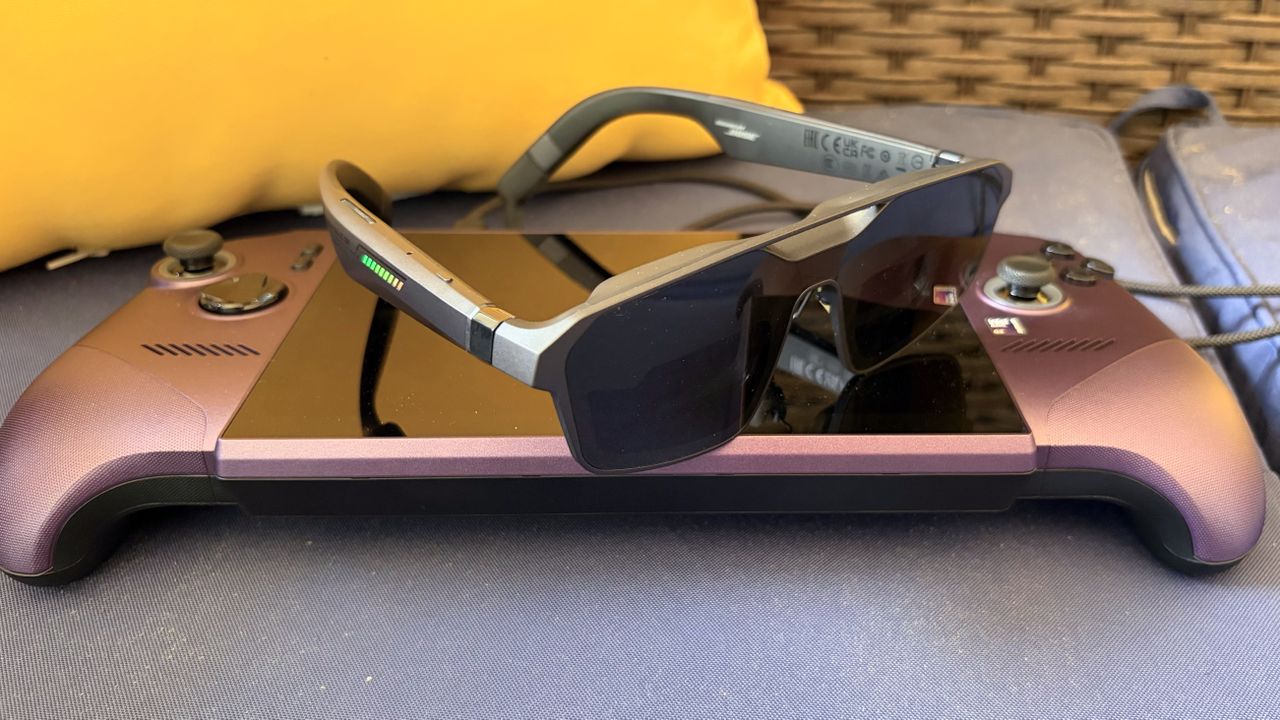
Tom’s Hardware described the R1 as using many of the same internals as Xreal’s One-series glasses, wrapped in a more angular ROG design. The temples include nine LEDs on each side, Republic of Gamers markings, open-air speakers, a USB-C port on the left temple, and hardware controls on the right temple.
The R1 uses flat-prism optics rather than bulkier birdbath-style lenses. It also has three levels of electrochromic dimming, so users can darken the lenses without clipping on a physical light blocker. The review notes that the darkest setting blocks most ambient light, though not all of it.
The package includes the glasses, a hard case, USB-C cable, prescription lens frame, two nose-pad sizes, a polishing cloth, and the ROG Control Box. The glasses also retain an accessory port between the nose pads for Xreal’s 6DoF camera module.
The dock is the console and desktop bridge
The ROG Control Box is the R1’s breakout hardware for PCs and consoles. Tom’s Hardware said it has one USB-C output for the glasses, plus two HDMI inputs, one DisplayPort input, and two USB-C ports for power and data. A top-mounted joystick and buttons control the on-screen display, including brightness, refresh rate, color modes, tint, and other settings.
On Windows, Asus’s DisplayWidget Center can control many of the same options. The review said the app exposes gaming, visual, and spatial-screen settings, including Frame Rate Boost, electrochromic tint, brightness, sharpness, color temperature, aspect ratio, screen size, virtual distance, interpupillary distance from 57 mm to 66 mm, and spatial lock.
The 240 Hz mode is not native
The central caveat is refresh rate. Tom’s Hardware found that the R1 runs natively at 120 Hz and reaches 240 Hz through a software Frame Rate Boost mode. In testing, that mode produced softer image quality, visible jitter, especially near the edges, and eye strain for the reviewer. The same behavior appeared through the dock and through a direct Thunderbolt 4 connection.
The reviewer said native 120 Hz mode did not show those visual problems. Tom’s Hardware also noted a possible fit factor: the reviewer’s 71 mm interpupillary distance sits outside the R1’s supported 57 mm to 66 mm range, which may have made the 240 Hz artifacts more noticeable.
With a desktop PC using a Core Ultra 7 265K and an RTX 4060 Ti, the review reported more than 100 fps in Battlefield 6 at 1080p with DLSS Balanced and High settings, and similar frame rates in Lego Batman: Legacy of the Dark Knight with details maxed. Even so, the reviewer preferred a 49-inch DQHD 240 Hz OLED desktop monitor for desk play.
The R1 made more sense with a handheld gaming PC. Connected to an MSI Claw 8 EX AI+ over a single Thunderbolt 4 cable, the glasses replaced the handheld’s 8-inch 1200p screen with a much larger virtual 1080p display and kept the setup portable.
Tom’s Hardware’s bottom line was that the R1 is impressive as a premium handheld-gaming display, helped by decent Bose-tuned open-air speakers and broad connectivity. The review was much less sold on paying the premium for a software-assisted 240 Hz mode that may not look better to every user.
This story draws on original reporting from Tom's Hardware.