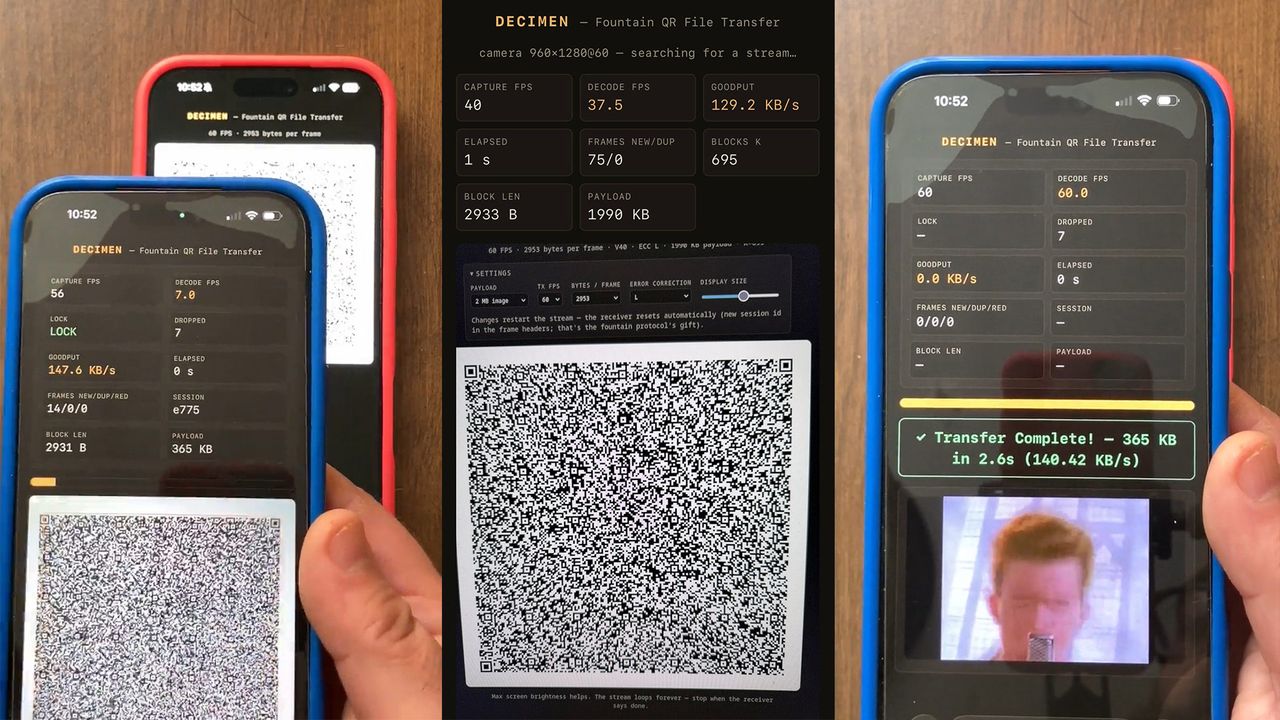
Decimen Optical Transfer is a browser-based proof of concept for moving files between phones by showing a rapid stream of QR codes on one screen and reading them with the other phone’s camera. Developer bashalarmistalt published the project on GitHub, saying the method avoids a dedicated app, shared network, pairing flow and permissions beyond camera access.
The developer describes the project as “fountain-coded QR file transfer.” In tests shared with the project, transfers reached roughly 128 KB/s when handheld and about 186 KB/s when both devices were kept still. The headline claim is nearly 190 KB/s, which is fast enough to make the trick more than a novelty, though still a proof of concept rather than a polished replacement for AirDrop, Nearby Share or a cable.
A Reddit post by Alstroph, linking to the same project, showed a video demonstration and described an air-gapped file transfer reaching 120 KB/s. The GitHub page and Reddit post frame the idea around phone-to-phone transfer when the devices are not on the same network.
How does Decimen Optical Transfer work?
The sender runs a cached web app in the browser and turns a file into a sequence of QR code frames. The receiving phone opens the same web app, grants camera access and records the changing codes from the other screen.
Each QR frame carries enough metadata for the receiver to understand what it is seeing. According to the project notes, a 20-byte header includes the session ID, sequence number, block count and size, file length and a hash. That means the receiver is not relying on an external connection to know where a frame belongs in the transfer.
The project uses fountain codes to make the optical link less fragile. A fountain code creates encoded chunks that let the receiver rebuild the original file once it has collected enough valid pieces, so missing a frame or reading frames out of order does not automatically sink the whole transfer.
That design fits the problem. Phone cameras drop frames, autofocus shifts, hands shake, screens refresh unevenly and QR readers do not behave like a clean wired channel. Bashalarmistalt’s implementation tries to tolerate that mess rather than pretending a camera pointed at a screen is a reliable pipe.
What affects the transfer speed?
The developer says performance depends on the devices and setup. In the project notes, the higher handheld result came from an iPhone using Apple’s ProMotion camera and stacked codes. The faster roughly 186 KB/s result required both sender and receiver to be held stationary.
The system updates QR codes at up to 60 frames per second, but the real data rate depends on how much payload fits into each code and how many frames the receiving camera can decode cleanly. The tradeoff is familiar: push more data per frame and the QR code gets denser, which makes it harder for a moving camera to read.
Bashalarmistalt says they used Claude Code to help build the cached web app and that the concept was developed independently, while acknowledging that similar QR-code transfer projects have existed before. The software is released under the MIT license, so other developers can inspect, modify and reuse the code under that permissive license.
The practical appeal is narrow but real. For two phones that cannot or should not share a network, a screen-to-camera transfer path can be useful. It is also constrained by physics and patience: alignment, brightness, camera quality and device stability matter, and the published numbers come from developer testing rather than independent benchmarking.
This story draws on original reporting from Tom's Hardware.