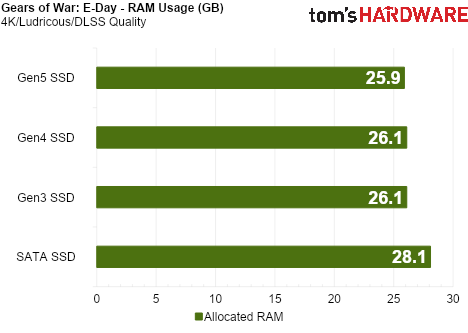
Tom’s Hardware testing of a Gears E-Day NVMe SSD install found the game reading from storage at more than 1GB/s on higher graphics presets and using about 2GB less system RAM than when installed on SATA storage. The result is a useful reminder that, for this game, the drive is doing more than loading levels and then taking the afternoon off.
The publication measured up to 3.7GB/s of peak throughput at the Ludicrous preset, with a 1.3GB/s average. At Ultra, it reported 2.8GB/s peak and 1.2GB/s average; High reached 2.5GB/s and 1.05GB/s. Medium and Low averaged 824MB/s and 359MB/s, respectively. These are results from one test configuration, not a universal storage requirement for every PC running the game.
Tom’s Hardware used HWiNFO with a 20-millisecond polling interval, rather than Task Manager, for the storage measurements. The throughput work ran at 4K with DLSS Quality on a desktop with a Ryzen 7 9800X3D, GeForce RTX 5090 and 64GB of RAM.
Does Gears of War: E-Day need a Gen5 NVMe SSD?
No, not based on this testing. Tom’s Hardware reported roughly the same 2GB RAM reduction with Gen3, Gen4 and Gen5 NVMe drives. That makes an existing NVMe drive the meaningful dividing line in the test, rather than the PCIe generation printed on its box.
The Coalition previously told Digital Foundry that it used the Xbox Series S SSD as an extension of working memory, moving detailed city data on and off storage as a scene needs it. The reported system uses heuristics to decide what to fetch and when, because asking storage for too much data at the wrong moment can hurt frame times. RAM remains the fast temporary workspace for active data; storage normally retains data between sessions. E-Day’s approach blurs those roles in a controlled way, as explained in this guide to RAM and storage.
The game supports DirectStorage, but Tom’s Hardware cautioned against treating that API as the whole explanation. Its earlier tests found that DirectStorage support alone did not necessarily produce high read activity. The observed throughput appears to reflect The Coalition’s broader asset-management approach.
What changes on SATA storage?
In the reported comparison, a SATA installation did not materially alter average frame rate on the 16GB laptop, which used an RTX 4060 Laptop GPU and Core i7-13620H. It did produce worse 1% lows and less consistent frame times at higher settings than the NVMe installation.
SATA also could not keep pace with the game’s reported sustained reads. Tom’s Hardware observed textures arriving late, followed by delayed lighting and shadows. The missing assets eventually loaded, but the scene briefly looked unfinished while the drive caught up.
The practical conclusion from this narrow set of tests is refreshingly unglamorous: players with 16GB of RAM or less should install E-Day on an NVMe SSD where possible. Buying a Gen5 drive specifically for the reported RAM saving is not supported by these results.
This story draws on original reporting from Tom's Hardware.