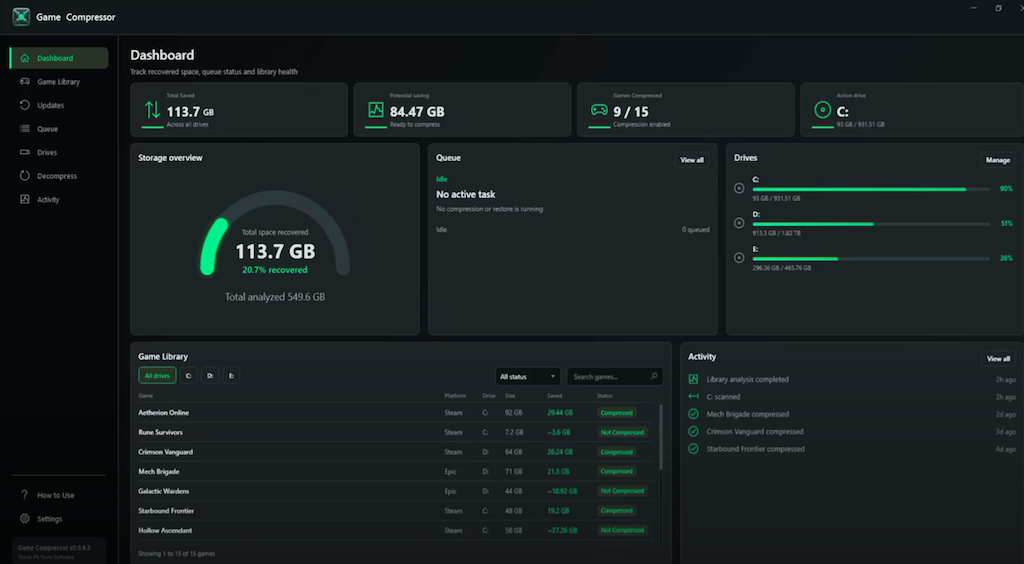
Game Compressor on Steam is pitching a mundane Windows feature at a suddenly expensive problem: PC games keep getting bigger, and SSD upgrades are getting harder to justify. Tom's Hardware reported that low-end 2 TB SSDs are nearing $250, with faster models priced higher, as NAND and storage shortages continue to pressure the market.
The utility, sold on Steam for $5.99 or 5.99€, uses Windows' built-in LZX compression for folders and files. It compresses installed games on disk while leaving them usable, so players can claw back capacity without deleting half a library to make room for one more 100 GB monster.
Tom's Hardware cited reported examples with large savings: ARK Survival Evolved falling from 169 GB to 91 GB, or 54% of its original size, and Crimson Desert dropping by 32 GB. Those figures will not apply to every game. Some assets, especially already-compressed media, have little room left to squeeze.
What is Game Compressor on Steam?
Game Compressor is a paid interface for Windows LZX compression aimed at game libraries. The underlying compression is not new, since Windows 10's command-line compress tool can use LZX, but the app adds discovery, estimates, controls and automation around that operating-system feature.
After setup, users choose watched folders. Tom's Hardware said Steam game directories appear to be filled in by the app, after which Game Compressor scans for installed titles. Before starting the work, it previews likely space savings so users can skip games that are unlikely to benefit.
Selected jobs go into a queue and can be paused or canceled, which is friendlier than running the Windows command line and hoping nothing needs attention. The app also lets users decompress chosen games later and keeps an operation log for troubleshooting. It tries to avoid wasting time on files that are poor compression targets, such as video files.
How does LZX compression affect game loading?
LZX reduces the amount of data read from storage, then asks the CPU to decompress it. Tom's Hardware said that can sometimes improve load times because less input-output work is needed, though the tradeoff is extra CPU overhead.
That overhead may be acceptable on many gaming PCs, where games often do not use every CPU core. The caveat is DirectStorage. Tom's Hardware cautioned against using this kind of compression on DirectStorage-enabled games because that API is built around moving data from storage toward VRAM, and adding CPU decompression may introduce stutter. The report described those titles as relatively uncommon.
What happens when a compressed game gets patched?
Game updates can undo compression on patched files. Tom's Hardware gave the example of a 50 GB game file receiving a patch and ending up decompressed afterward.
Game Compressor addresses that by monitoring patched games and applying compression again, preserving the space savings over time. That patch-aware behavior is the main convenience argument for paying for the app rather than using Windows' built-in command manually.
There is also a free route for users who want a graphical tool without buying the Steam app. Tom's Hardware pointed to the open-source CompactGUI project on GitHub, while saying Game Compressor offers a fuller feature set.
This story draws on original reporting from Tom's Hardware.