Lenovo’s ThinkStation P3 Ultra SFF Gen 2 gives mini-workstation buyers something the one-liter boxes usually cannot: room for more than a token expansion card. In a review published by ServeTheHome, the 3.9-liter system is presented as a compact workstation that trades a little desk space for actual PCIe flexibility.
The tested configuration, model 30J50035US, pairs an Intel Core Ultra 9 285 processor with 64GB of DDR5-6400 memory, a 1TB PCIe Gen5 M.2 SSD, and an Nvidia RTX 4000 Ada Generation SFF graphics card with 20GB of GDDR6 memory. The system runs Windows 11 Pro and uses a 330W external power supply.
That hardware puts the P3 Ultra SFF Gen 2 above Lenovo’s smaller ThinkStation P3 Tiny Gen 2 in expandability, according to ServeTheHome. The chassis measures 202 by 87 by 223 mm and weighs 1.8 kg, so it is still small by workstation standards, but no longer in novelty-mini-PC territory. Good. Some workloads need slots, not vibes.
Expansion is the point
ServeTheHome found two low-profile PCIe slots inside the machine: one PCIe Gen4 x16 electrical slot and one PCIe Gen4 x4 electrical slot in an x8 physical connector. The review unit arrived with the Nvidia RTX 4000 Ada SFF installed in the larger bay, leaving the smaller slot open for another card.
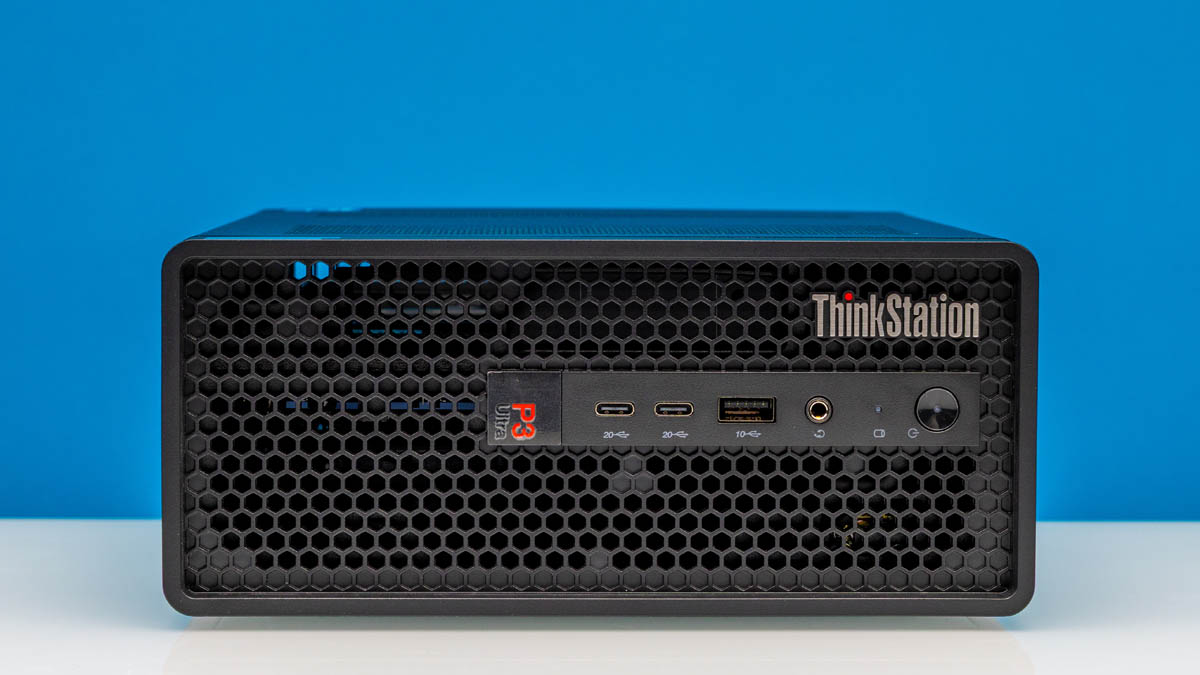
That layout is the main mechanical difference from many ultra-small workstations. A dual-slot low-profile GPU can fit, and the rear panel exposes the expansion brackets. Lenovo also built the front panel mostly as ventilation, a sensible choice for a small chassis carrying a desktop-class CPU and workstation GPU.
The machine can sit flat or stand vertically, with rubber feet for both orientations. ServeTheHome notes that Lenovo’s branding reflects that split use: one label reads horizontally, another vertically. Industrial design departments must justify themselves somehow.
Ports are useful, with a few choices to side-eye
The front panel includes two USB-C ports rated at 20Gbps, one 10Gbps USB-A port, a 3.5mm audio jack, the power button, and a drive activity LED. ServeTheHome points out that the Intel Core Ultra platform supports 40Gbps USB4 and Thunderbolt 4, but Lenovo did not expose that speed on the front ports in the tested system.
Rear I/O includes four 10Gbps USB-A ports, three full-size DisplayPort 1.4 outputs from the integrated Intel graphics, and a single RJ45 Ethernet jack. The Nvidia card adds four mini-DisplayPort 1.4 outputs. ServeTheHome notes that there is no HDMI port on the system, though the rear DisplayPorts are labeled as DisplayPort++ capable.
The stranger omission is networking. Lenovo ships the workstation with only gigabit Ethernet, according to the review, despite the chassis being far larger than the one-liter class and aimed at workstation users. Wireless is more current: the spec list includes Wi-Fi 7 and Bluetooth 5.4 through an Intel BE200 module.
ServeTheHome also reports that Lenovo offers an optional Thunderbolt 4 upgrade that adds a single 40Gbps USB-C/Thunderbolt 4 port in an unused rear-panel block. That means buyers who need faster external I/O may have to select the right configuration rather than assume it is standard.
The result, as described by ServeTheHome, is a compact workstation with a clearer reason to exist than many AI-branded mini PCs: it has enough volume for a real low-profile GPU and another PCIe card. Lenovo’s defaults on Ethernet and Thunderbolt are less generous, which is exactly the sort of footnote buyers should catch before procurement turns into a return ticket.
This story draws on original reporting from ServeTheHome.