MMO mouse productivity is less about pretending your spreadsheet is a raid boss and more about putting repetitive commands under your thumb. Multi-button mice such as Razer’s Naga, SteelSeries’ Aerox 9, Corsair’s Scimitar and Redragon’s M908 and M913 expose a simple idea: the same side-button grids built for game abilities can also trigger desktop shortcuts, macros and application-specific command sets.
The category grew out of MMO and MOBA gaming, where players often need more inputs than a standard two-button mouse can offer. In games cited such as World of Warcraft and Final Fantasy XVI, abilities and spells can fill the number row from 1 through 12, while movement still depends on keys such as WASD and Space. Modifier combinations add even more bindings, which is exactly the sort of finger-twister that makes a thumb grid attractive.
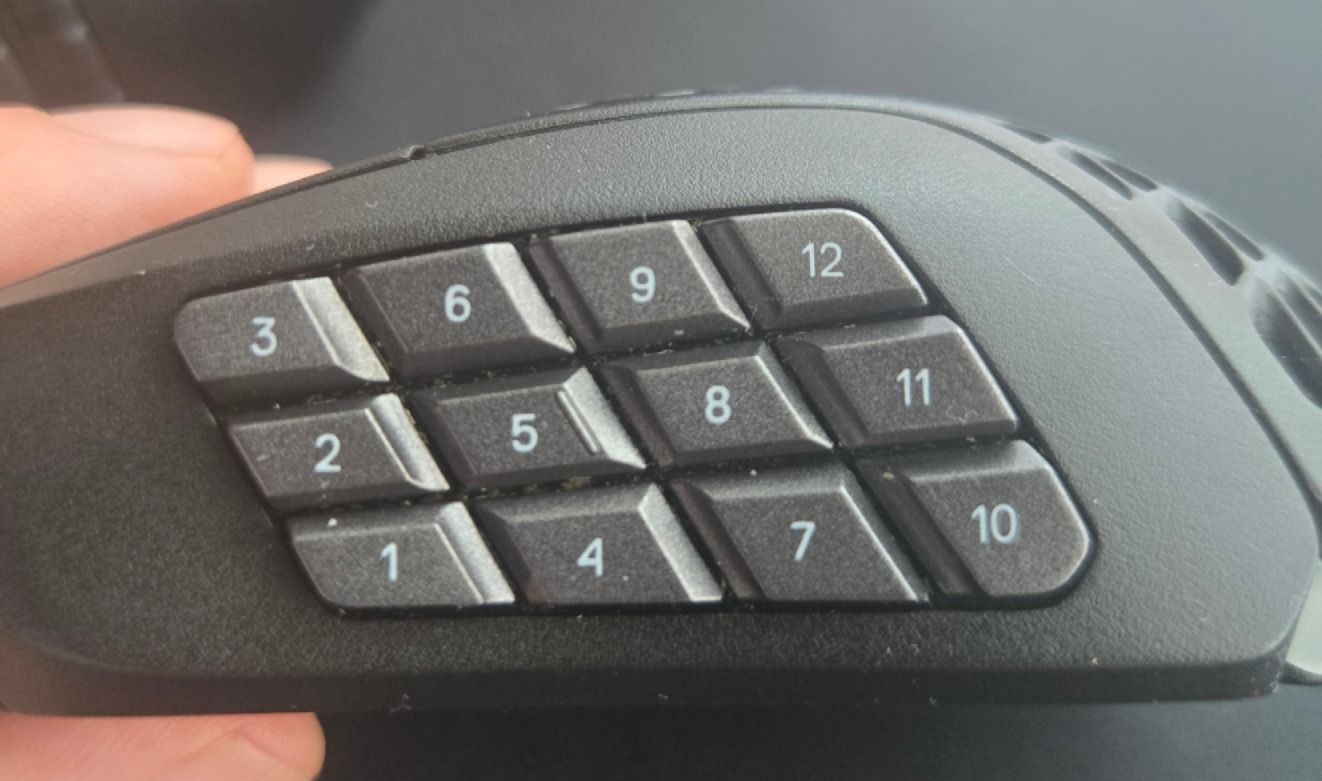
Earlier designs such as the Razer Hex used six side buttons arranged around a small rubber thumb rest intended to reduce accidental presses. The Razer Naga later pushed the layout to a 12-button side panel, a design now echoed across many MMO mouse lines. That many buttons under one thumb takes practice, and manufacturers use different button shapes to help users tell positions apart by feel.
How does an MMO mouse improve productivity?
An MMO mouse improves productivity by letting users assign common actions to mouse buttons instead of reaching for keyboard shortcuts or separate macro pads. The mechanism is basic but useful: mouse software maps a physical button to a keystroke, a multi-key shortcut, or a recorded macro.
Razer Synapse, Corsair iCUE and SteelSeries GG are named examples of software that can reassign many mouse controls, including DPI buttons. For productivity work, that means copy, paste, formula entry, timeline commands or other repeated actions can move from the keyboard to the mouse.
Video editing and spreadsheet work are obvious fits. A user can bind frequently used commands to the 12-button grid on a SteelSeries Aerox 9, for example, reducing trips to the keyboard during tasks that repeat hundreds of times. A number pad can serve some of the same purpose, but the mouse keeps the commands under the hand already selecting cells, clips or interface controls.
Application profiles are the cleaner trick. The cited software can be set to detect programs such as Adobe Premiere Pro or DaVinci Resolve and switch the mouse’s button assignments for that app. A button that pastes in a spreadsheet can become an editing command in a video timeline without the user manually changing layouts.
Modifier keys extend the scheme further. Assigning a modifier lets one button grid carry additional layers of commands, although that also increases the memory load. The payoff comes only after the user learns the layout well enough to hit buttons without checking them.
Which MMO mice are available?
The models identified include Razer’s Naga line, SteelSeries’ Aerox 9, Corsair’s Scimitar, Redragon’s M908 and M913, and Logitech’s G600. The G600 is no longer in production, though it can still be found online at higher prices because of its scarcity.
Retail examples cited include the Razer Naga V2 Hyperspeed Wireless at Best Buy for $64.99, the SteelSeries Aerox 9 Wireless at Amazon for $134.99, the Redragon M908 Impact at Amazon for $23.07, and the Corsair Scimitar Wireless Elite SE at Amazon for $113.99. Prices and availability can change, because retail listings have a bad habit of doing exactly that.
The catch is muscle memory. A 12-button thumb grid is powerful only after the user spends time training the thumb to find each button accurately. For people who already rely on multiple keyboards, macro pads or devices such as Stream Deck for routine work, an MMO mouse offers a compact alternative that keeps many commands on the pointing hand.
This story draws on original reporting from Tom's Hardware.