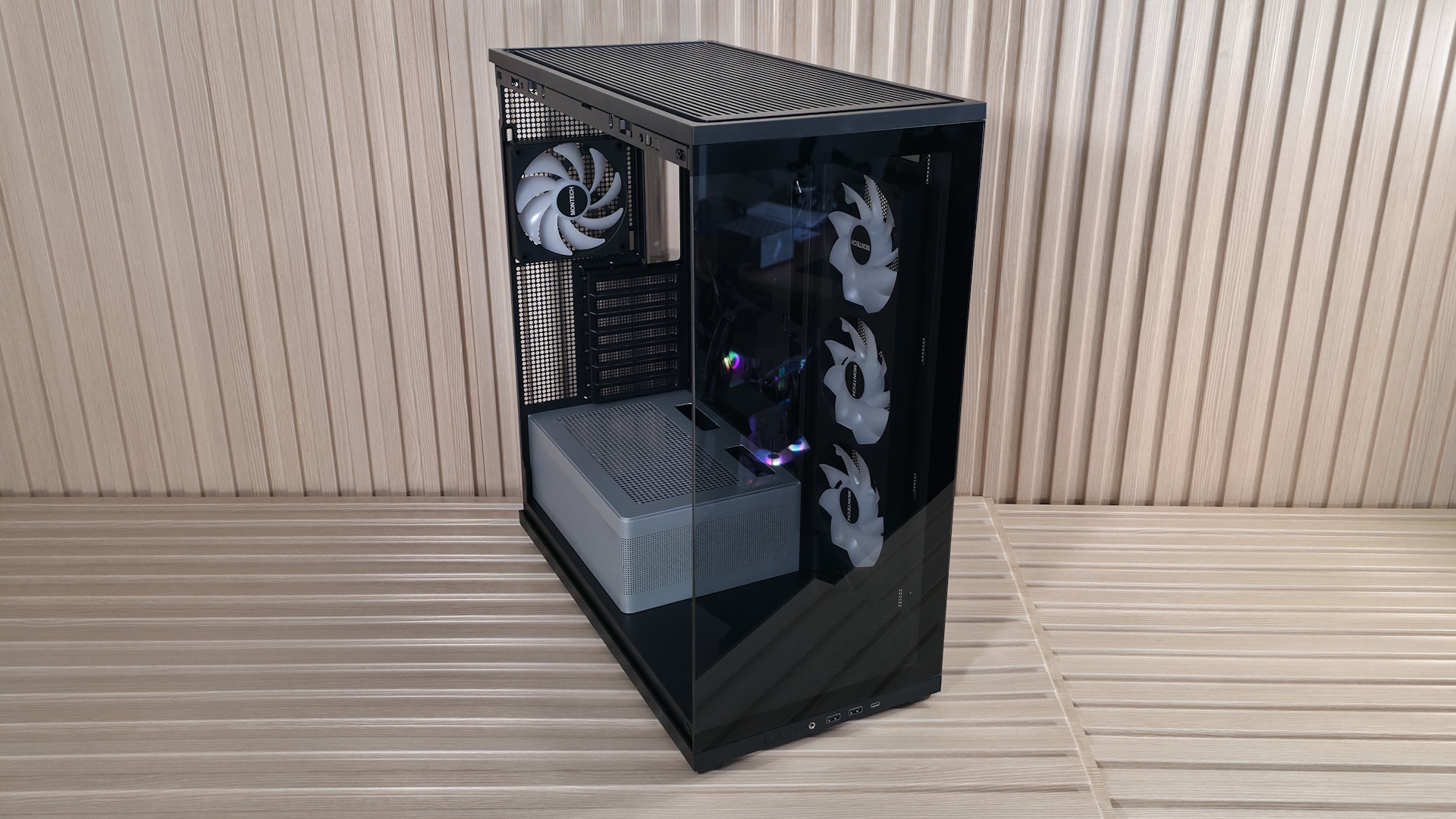
A Montech TG3 review from Tom’s Hardware finds that the panoramic ATX mid-tower delivers an unusually complete feature set at its stated $59.90 MSRP. That price buys lightly smoked tempered-glass panels at the front and side, a raised power-supply chamber with an ARGB light strip, and enough room for current large components. The catch is that its stock cooling arrangement is more complicated than the usual “four fans included” label suggests, and it will not suit every air-cooled build equally well.
The case has a tiered interior, with a small display area ahead of the power-supply shroud for a figure or other object. Tom’s Hardware estimates the space at about 7 by 7 by 17 inches when the graphics card does not project past the motherboard’s edge. Bigger GPUs reduce that available length, because physics remains stubbornly unimpressed by marketing copy.
It comes in black and white. Tom’s Hardware says the white version has a matching power-supply chamber, while its black sample used a silver one.
Is the Montech TG3 good for a high-power PC build?
It can accommodate one. The TG3 supports Mini-ITX, MicroATX and ATX boards, including rear-connect designs that move many cables behind the motherboard. Its listed clearances are 180 mm for an air cooler, 430 mm for a graphics card and 250 mm for an ATX power supply. Vertical GPU mounting is supported, but requires Montech’s separately sold VGM 2 kit.
For cooling expansion, the specification lists mounts for three 120 mm or 140 mm fans at the top, three 120 mm fans at the side, two 120 mm fans on the PSU shroud and one 120 mm or 140 mm fan at the rear. Radiator support reaches 360 mm at the top, 240 mm at the side and 120 mm at the rear.
- Preinstalled cooling: one side-mounted GF360 U Rev unit and one rear GF120 U unit.
- What that means: the side unit occupies three 120 mm positions, but it is one full-frame 360 mm assembly rather than three separately mounted fans.
- Storage: one 3.5-inch drive or two 2.5-inch drives.
- Slots: seven PCIe expansion slots.
That distinction matters for builders planning replacements or cable routing. KitGuruTech also identified the side array as one unibody 360 mm fan, using one PWM and one RGB connection, alongside the rear 120 mm fan. Its reviewer found the chassis structurally solid despite some flex when pulled firmly, but noted that the riveted PSU shroud cannot be removed and worried rear-connect-board cabling could be tight.
Cooling and desk-placement trade-offs
Tom’s Hardware reported strong CPU results in its own air-cooled tests, including some of its best temperatures with new test hardware, despite saying the side intake is not an advantage for high airflow. KitGuruTech’s separate smoke test observed air entering from the side and moving upward rather than directly through its tower CPU cooler. In that outlet’s combined stress test, the CPU ran hot under its stated 140 W load. The two tests used different methods, so they do not establish a single thermal verdict. They do point to a practical conclusion: builders using power-hungry air-cooled hardware should consider cooler selection and top exhaust capacity rather than treating the stock side fan as a guaranteed CPU-airflow solution.
The front I/O sits along the lower edge, making the TG3 more comfortable on a desk than on the floor. It includes two 5 Gbps USB Type-A ports, one 10 Gbps USB Type-C port, a 3.5 mm headset jack, plus power and RGB-mode controls. The removable glass panels use tabs and frame slots; the top uses a ball-and-socket retention system. Tom’s Hardware found them secure, while advising care when moving the case because chassis flex can release them.
The TG3’s value case is credible at its stated MSRP, especially for a display-first build that needs ATX compatibility and modern front I/O. Its limited drive capacity, low I/O placement and stock airflow pattern are the compromises to weigh before buying.
This story draws on original reporting from Tom's Hardware.