Omada’s new Omada Fusion Gateway 2.5G is being pitched at small-business networks that have outgrown the ISP router in the corner but do not want a firewall appliance that treats setup like a hazing ritual. ServeTheHome, in a sponsored overview, said the gateway combines five 2.5GbE ports with a local, subscription-free controller for managing the wider Omada network.
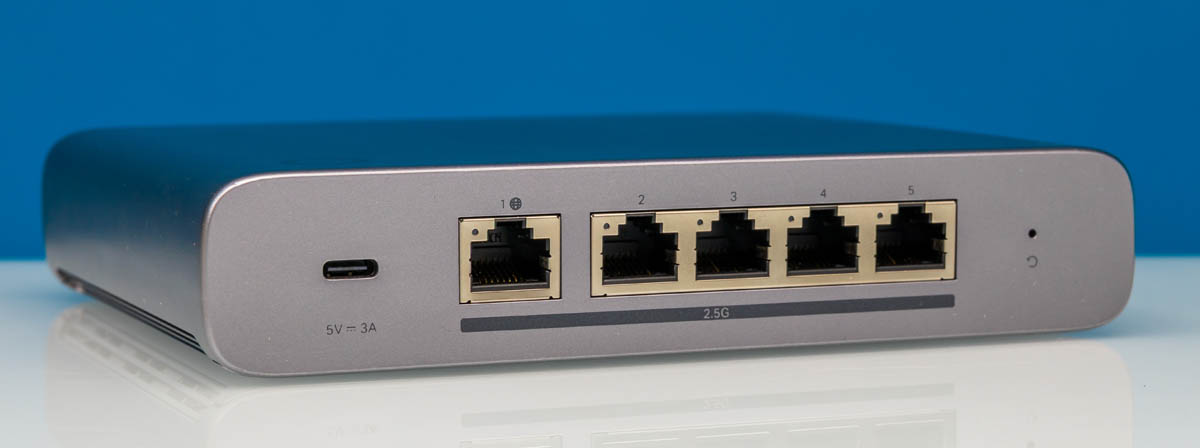
The hardware is a compact gateway with a small color touchscreen on the front for diagnostics. Around back, ServeTheHome identified a USB Type-C port and five 2.5GbE Ethernet ports, making the box better matched to WAN connections in the 1Gbps to 2Gbps range than older gigabit-only gateway hardware.
Omada sent ServeTheHome the gateway along with a PoE+ switch, several Wi-Fi access points and mounting hardware so the site could evaluate the gear as a managed network rather than as one standalone router. ServeTheHome disclosed the coverage was sponsored and said more detailed looks at the individual devices would follow.
What is the Omada Fusion Gateway 2.5G?
The Omada Fusion Gateway 2.5G is a business gateway with an integrated local controller, meaning it can manage connected Omada switches and access points from one interface. That matters because VLANs, wireless networks, guest access and device settings can be pushed centrally instead of being configured one box at a time, which is the sort of busywork networking vendors keep pretending is character-building.
Setup can be handled through a Bluetooth app or by logging in to the default gateway address, 192.168.188.1, according to ServeTheHome. The site said the process was less painful than setup on some Fortinet or SonicWall devices, while noting that a console interface would have been useful for administrators who prefer serial automation.
The software is the product here
After setup, the gateway presents a dashboard-style web interface. ServeTheHome compared the general experience to Ubiquiti UniFi, while noting that each platform has its own feature set and way of doing things. The comparison is useful: Omada is aiming at buyers who want business-network controls without turning every change into a command-line archaeology project.
The interface includes VPN configuration and support for different VPN types, according to ServeTheHome. On the WAN side, the system also exposes multi-WAN options, including scenarios such as a VPN on a WAN link or a backup connection using 5G, Starlink or another wired ISP.
Wireless settings can also be created from the gateway’s controller. ServeTheHome said users can configure WLANs, guest networks and radio settings, then have those settings propagated to Omada Wi-Fi access points. The same controller view can show LAN topology and a client list with connection details.
Security and troubleshooting tools are also present in the interface. ServeTheHome found options for IDS/IPS, content blocking, ping, packet capture and other network utilities. The site said it planned to test the IDS/IPS functions later using a Keysight CyPerf setup, so performance claims on that front remain for future testing.
One additional feature called out by ServeTheHome is a controller migration tool for moving to another unit. Backup and restore are common on managed-network gear, but a guided migration assistant is a useful nod to the fact that gateways eventually get replaced, ideally before someone is crouched in a network closet regretting all prior life choices.
This story draws on original reporting from ServeTheHome.