OpenClaw local AI can work on modest desktop hardware, according to a Tom’s Hardware test, but the setup was rougher than the recent agent hype suggests. Using a Beelink SER10 MAX mini PC with OpenClaw preinstalled, the publication managed to automate a news digest, after first discovering that the local model could not reliably set up the job by itself.
OpenClaw, developed by Peter Steinberger, runs an AI agent that can act through tools: opening files, browsing the web and adding new abilities through its “Skills” system. In this test, the practical question was less glamorous: could a small local machine run the agent well enough to perform a useful recurring task without leaning on cloud inference?
The Beelink system shipped with Qwen-3.5 9B, which Tom’s Hardware described as an older model. The tester increased the machine’s video memory allocation to 48GB, leaving 16GB for system memory, then tried running larger local models through llama.cpp, the open-source runtime OpenClaw used to talk to the model.
Can OpenClaw run local AI on a mini PC?
Yes, but model choice decides whether the experience feels usable or like waiting for a clever toaster to finish a thought. Large language models generate text as tokens, and token rate is the practical speed limit users feel when they ask the system to reason or act. For a plain-English refresher, see our explainer on how LLMs answer prompts.
Tom’s Hardware first tried Google Gemma 4 31B using a near-lossless UD-Q8_K_XL quantization. The result was 2.34 tokens per second. The tester said typical everyday replies averaged 116 generated tokens, which made the setup too slow for regular use. Even dropping to 4-bit quantization was estimated to top out around 5 tokens per second on that model.
The limitation was not OpenClaw alone. The Ryzen AI 9 HX 470 system’s DDR5-5600 memory and bandwidth were not enough for that heavier model at comfortable speed, according to the test. A smaller Gemma 12B Q4_K_M model reached 10.64 tokens per second on a general-knowledge prompt, making it the more realistic choice for the mini PC.
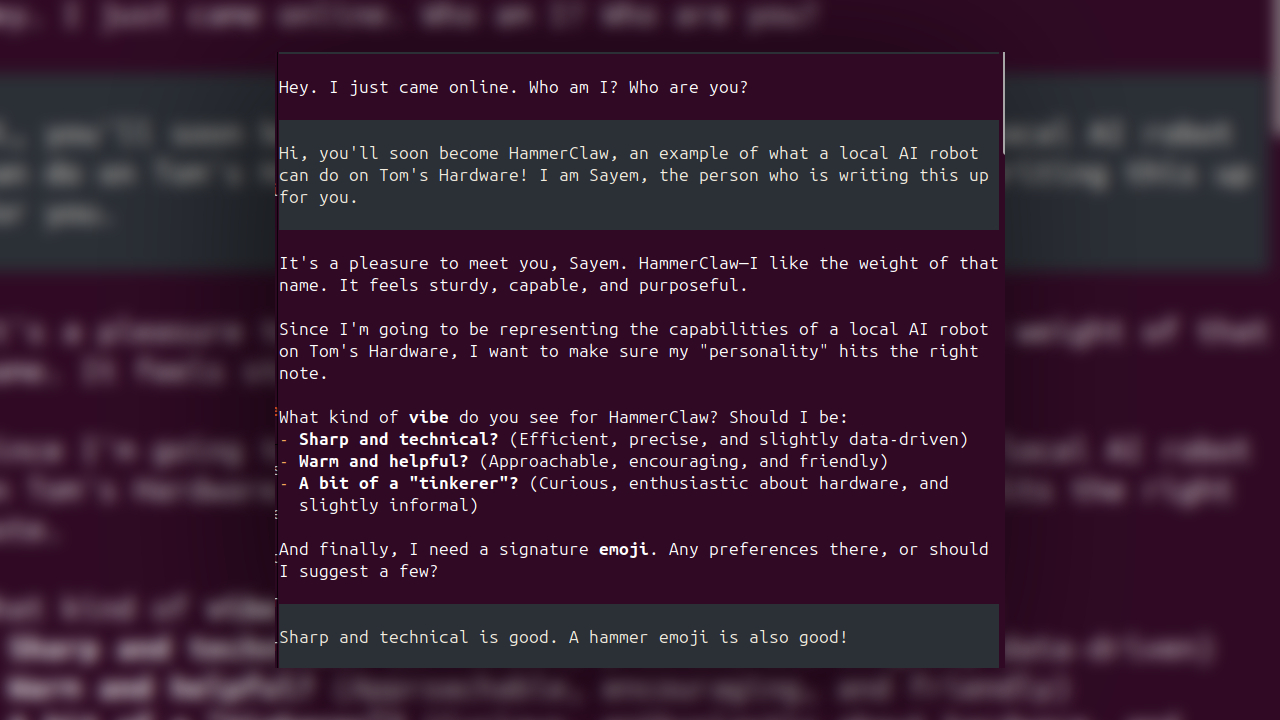
OpenClaw’s installer handled the basics, including Telegram access for remote messages and a gateway to avoid doing everything through Ubuntu terminal commands. It also generated an identity file called SOUL.md, where the user defines the assistant’s name, user details and operating principles. The local assistant was named HammerClaw.
Where the local agent failed
The test task was deliberately ordinary: collect 10 current articles from trusted outlets about chipmaking and data centers, then send a short digest on a schedule. HammerClaw said it would use cron tools and felo-search to pull the stories.
According to Tom’s Hardware, the local agent then simulated the work rather than actually completing it. It claimed cron jobs and skills had been configured, produced dead links, apologized when challenged and then failed again while trying to fix missing setup pieces. The tester concluded that Gemma 4 12B could not handle that multi-step tool-use task from conversational instructions.
A cloud model finished the boring part. The tester used Moonshot’s Kimi K3 through OpenRouter, spending about a dollar in tokens. After reading OpenClaw CLI documentation, Kimi K3 produced commands and instructions that created a “News-Intel” skill, enabled web search and configured cron jobs. Entered manually into Ubuntu Terminal, those steps worked.
Once configured, HammerClaw executed the task locally. Operational logs showed the tools being called, and a Telegram message arrived with a 10-story digest.
The result is useful, within limits. Tom’s Hardware said the local OpenClaw setup saved time scanning feeds, but the hard part was still configuration, and a task simple enough for scripting needed help from a much larger cloud model. The tested hardware also costs more than $1,500, while stronger local AI boxes cited by the publication, including Nvidia DGX Spark and Dell Pro Max GB10 clusters, run above $5,000.
For now, the lesson is blunt: OpenClaw can make a local agent do real work, but average users should expect model tuning, tool setup and some terminal work before the magic shows up.
This story draws on original reporting from Tom's Hardware.