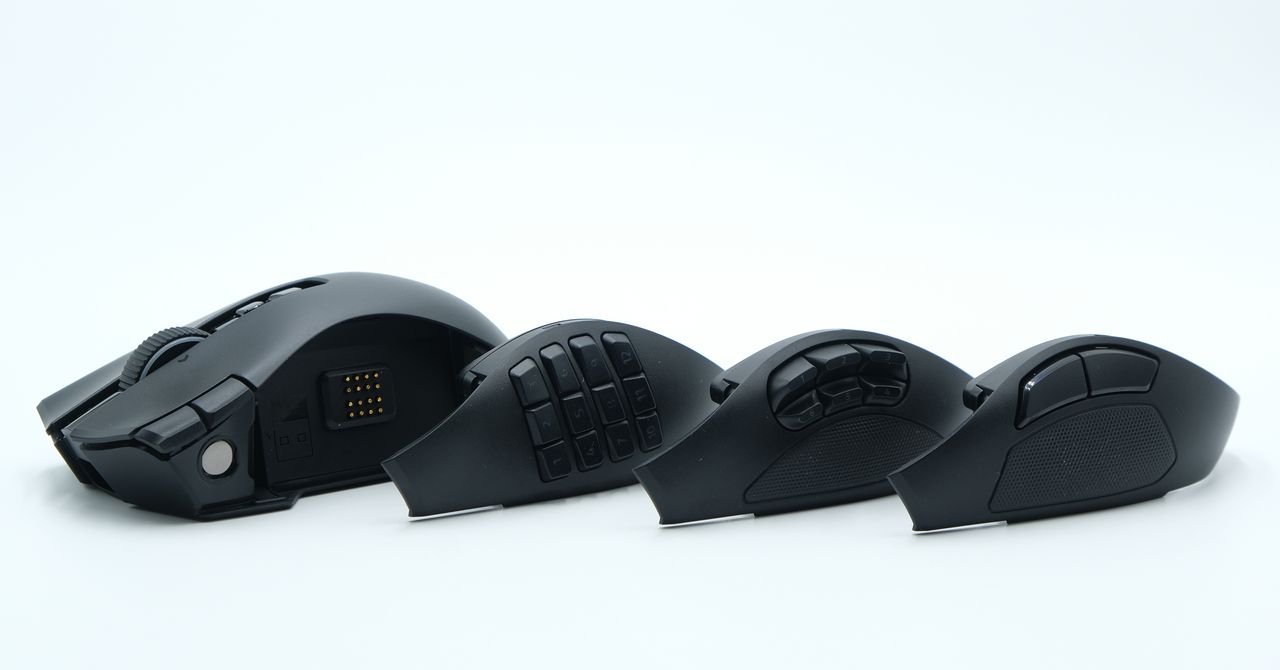
This Razer Naga V3 Pro review reaches a fairly clear verdict: this is a comfort-and-customization mouse for people who want thumb-accessible commands, not an ultralight tool for competitive shooter obsessives. WIRED gave the mouse an 8/10 rating and listed it at $180 at Razer. Its broad right-handed shell, modular side controls and unusually flexible scroll wheel make a plausible case for gamers who also spend their day wrestling with editing software or spreadsheets.
The central trick is no mystery, though Razer has packed in enough switches to make it feel like one. The Naga V3 Pro accepts magnetic side panels with two, six or 12 programmable buttons. Pogo pins connect each panel, and the review says Razer Synapse detects the installed layout and retains separate keymaps for it. There is also storage for the USB dongle beneath the panel.
Which Razer Naga V3 Pro side panel should you use?
The two-button panel is the conventional choice. It provides larger thumb buttons and a rubberized grip area, making it the best fit of the three for players who want a familiar shooter-style layout without a thumb-mounted keypad.
The six-button option supplies more commands without the density of a full number pad. WIRED found it suited to games that use occasional macros or movement-heavy play where a user wants to keep fingers on the keyboard’s WASD keys. The 12-button panel is aimed at people who can actually use that many immediate inputs, including players with command-heavy game setups and users assigning shortcuts in creative applications.
That modularity has a practical point beyond genre labels. A programmable mouse button can trigger a key, shortcut or macro, putting repeated commands under the thumb instead of forcing a reach across the keyboard. WIRED found the Naga useful for multimedia tasks and photo or video editing, where repeat inputs can pile up fast.
Is the Razer Naga V3 Pro too heavy for FPS games?
It depends on what a buyer is leaving behind. The Naga weighs 113 grams with the two-button panel, 115 grams with the six-button version and 116 grams with the 12-button panel. WIRED said its low, balanced weight distribution made it feel less burdensome than the numbers suggest, but also warned that anyone accustomed to a 60-gram gaming mouse will notice the extra mass. Fast, repeated flicks are not where this design earns its keep.
The large, wide body favors a palm grip and remains usable with a claw grip, according to the review. WIRED described it as comfortable over extended sessions. A third side button can serve as another input or as a finger rest; a switch on the underside can lock it out. That matters because the reviewer identified it as the button most likely to be pressed by accident.
Razer also gives the scroll wheel smooth and ratcheted modes, plus a precision-tactile setting with closer-spaced steps. Tilt inputs allow horizontal scrolling and can be remapped, which is more useful in a timeline or spreadsheet than in a marketing render of “pro” gaming gear.
The compromises are plain: black is the only color, and using 8 kHz polling requires an additional dongle. Buyers seeking the lightest possible mouse have better reasons to keep shopping. Those who value long-session comfort and configurable controls have a more persuasive option here.
This story draws on original reporting from WIRED.