This Acer Swift Go 16 AI review comes down to the number on the checkout page. Tom’s Hardware found the AMD configuration to be a sensible large-screen portable at a cited $799 sale price, but a far less persuasive buy at its $1,149 MSRP. Those were prices observed during the review, not current offers. Acer has packed useful hardware into a 3.53-pound chassis, then made a few irritating choices that prevent the machine from feeling as polished as its metal exterior suggests.
The specific machine tested was the SFG16-A71T-R5UY, with AMD’s Ryzen AI 7 445, integrated Radeon 840M graphics, 16GB of LPDDR5X memory and a 1TB PCIe Gen 4 SSD. That configuration detail matters. Acer sells the Swift Go 16 AI family with varying parts, including OLED display options and higher-end processor and graphics choices, so the badge on the lid does not guarantee this spec sheet.
Is the Acer Swift Go 16 AI worth buying?
For someone who wants a relatively light 16-inch Windows laptop for everyday productivity and wants ports without carrying a dongle collection, the reviewed model has a credible case when discounted. At MSRP, Tom’s Hardware said the trade-offs were harder to accept, particularly when an Intel-based Swift Go 16 with an OLED screen had been discounted elsewhere.
There is no supplied benchmark or battery-rundown data to establish a performance or endurance ranking. Acer markets the AMD family as a Copilot+ PC and promotes AI features, extended mobility and gaming capability, but those are company claims rather than findings established by this review.
What does the reviewed model include?
- A 16-inch, 1,920-by-1,200 IPS touchscreen with a 120Hz refresh rate
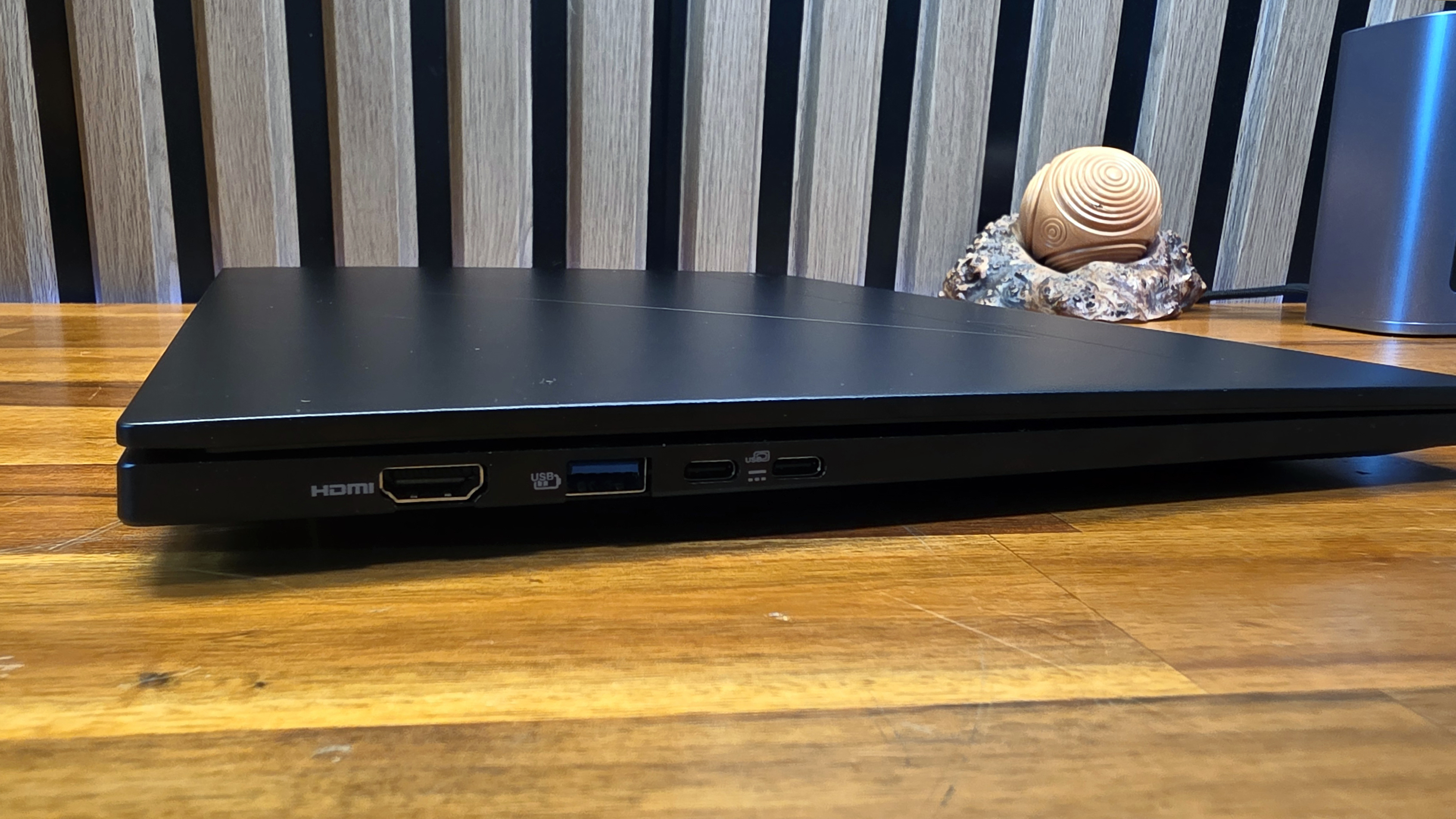
- Two USB4 Type-C ports, two USB 3.2 Gen 1 Type-A ports, HDMI 2.1, microSD and a headset jack
- Wi-Fi 7, Bluetooth 5.4 and a 5MP infrared camera
- A 65Wh battery and 100W USB-C power adapter
- A black aluminum body measuring about 14 by 9.89 by 0.63 inches, with a hinge that opens flat to 180 degrees
The 1TB SSD is generous for this price category, while the 16GB figure refers to working memory rather than file capacity. Memory and storage do different jobs: RAM holds active programs and data, while the SSD keeps files when the laptop is off.
Connectivity is the sharpest practical advantage. Tom’s Hardware called the port selection good, and the inclusion of USB-C, USB-A, HDMI and microSD covers common desk and camera-card use without an adapter. Acer, for reasons known only to Acer, put the charging-status light on the opposite edge from the charging ports. The reviewer had to look across the machine to confirm it was charging.
The panel is also a configuration-specific compromise. This unit uses IPS, not the 2K OLED available on other Swift Go 16 AI variants. Tom’s Hardware reported significant apparent brightness loss from viewing angles when the display was reclined flat. Acer confirms that the family is offered with either OLED or touch WUXGA display options, depending on model and region.
The aluminum shell gives the laptop a step up from basic plastic systems, but the reviewer found flex in both lid and keyboard and reported lid smudges that resisted cleaning. One oddity should not be inflated into a product-wide defect: the reviewer said a magnetic clasp on a watch band appeared to dim the screen and return Windows to its login screen. Removing the watch or changing wrists stopped the behavior in that test.
The verdict is suitably unglamorous. The Swift Go 16 AI configuration tested has a useful screen size, storage and unusually complete I/O in a portable frame. Buy on a meaningful discount; at list price, its IPS panel and flexible, fingerprint-prone chassis ask for more patience than they should.
This story draws on original reporting from Tom's Hardware.